Case study · Commercial electrical
OpsSync: streamlining operations for a large electrical company.
Connecting jobs, technician schedules and operational reporting in one workspace — built around the realities of commercial electrical work.
- Client
- Large electrical company · Client unnamed
- Platform
- OpsSync · Operations & workforce management
- Focus
- Jobs, scheduling, approvals & reporting
At a glance
Summary in five steps
- Problem
- Jobs, technician schedules and approvals lived in separate places, making coordination slow.
- Solution
- OpsSync: one workspace for jobs, weekly scheduling, reporting and approvals.
- Outcome
- A single, shared operational view. Measured KPI results not yet published.
- 1
Map the operating model
Document how jobs are created, who allocates technicians and which approvals hold up delivery.
- 2
Centralise every job
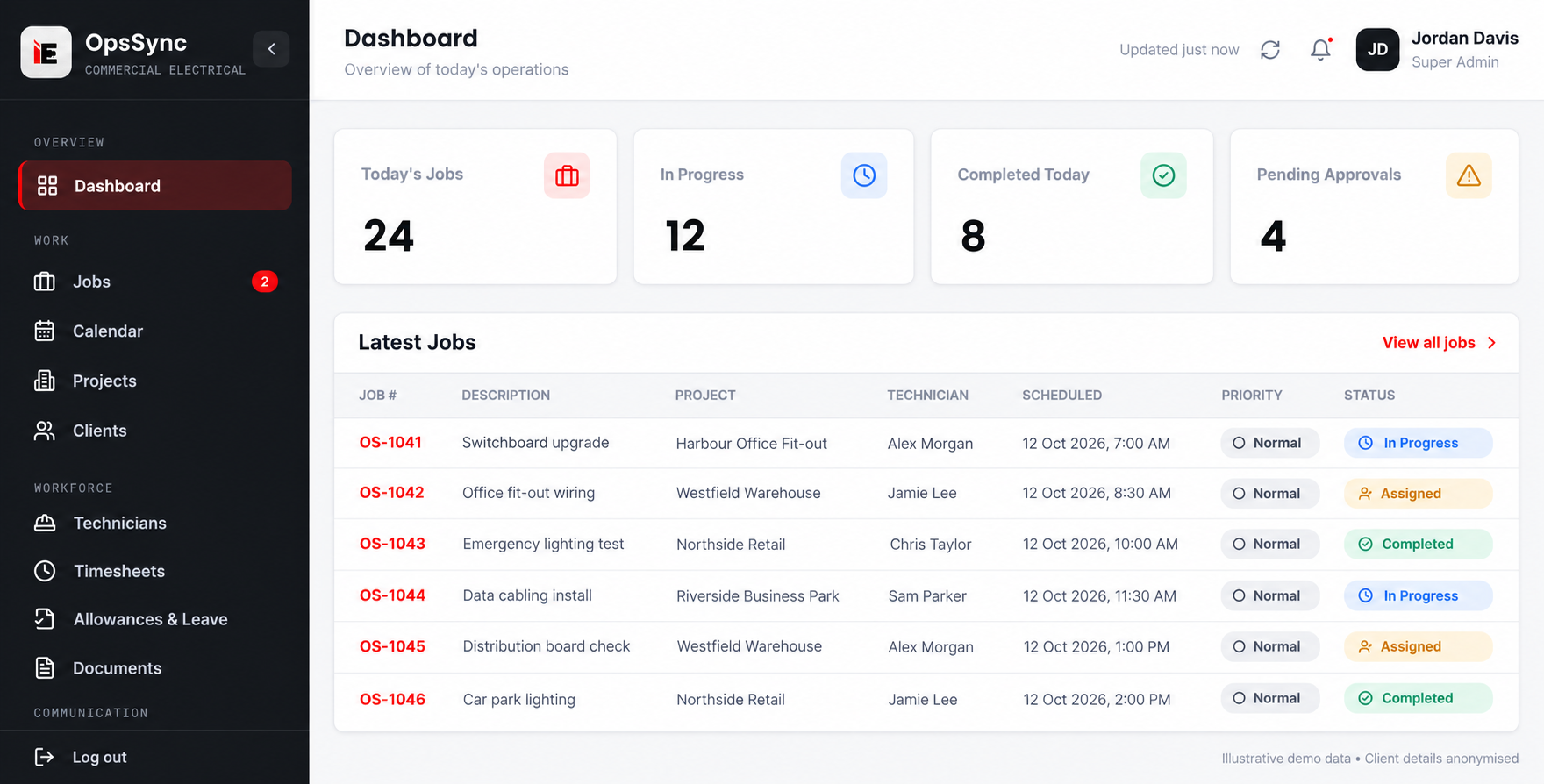
Bring description, project, site, technician, time, priority and status into one job list.
- 3
Schedule the field team
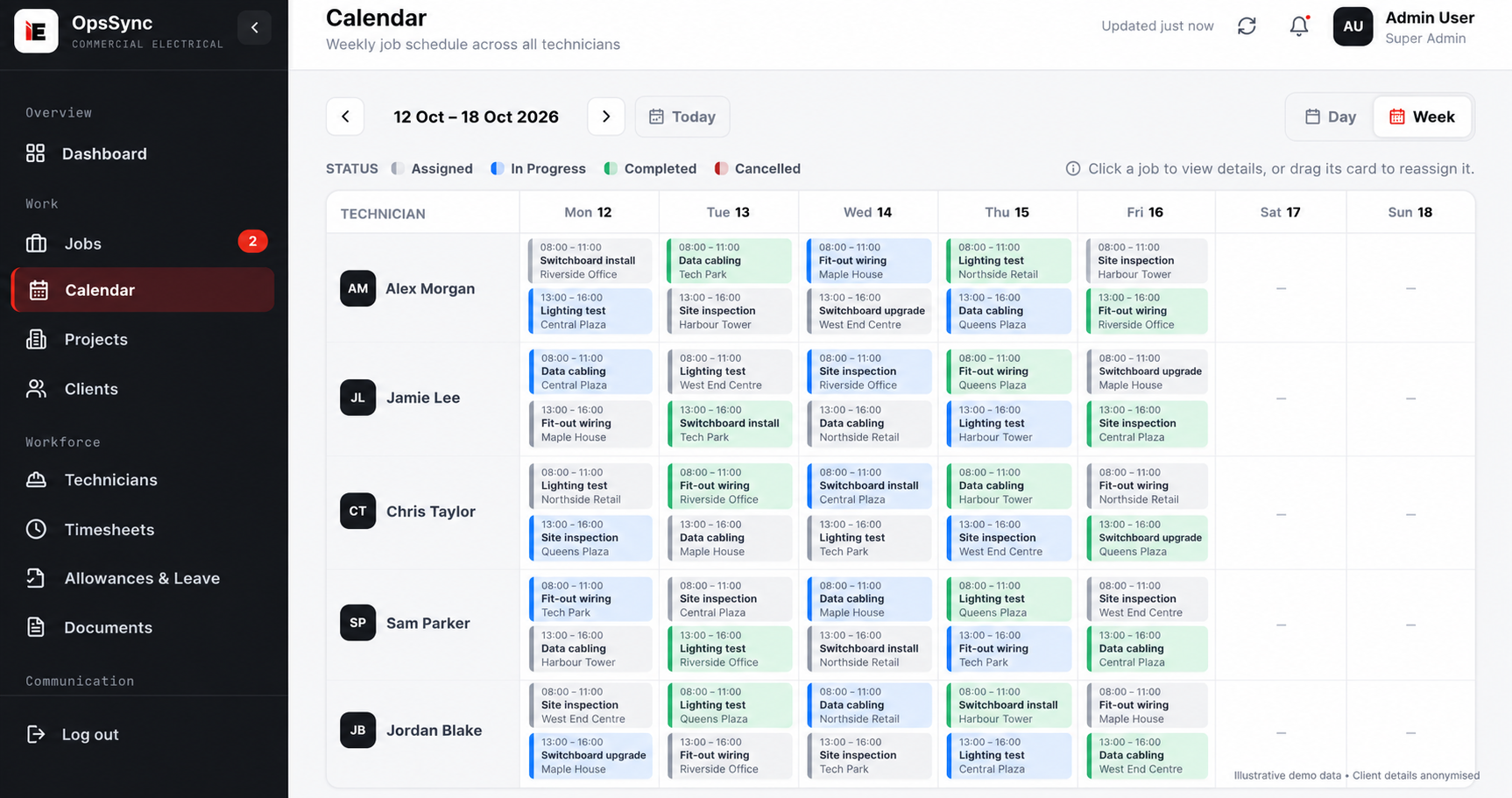
Plan work by technician and day in a shared weekly calendar with colour-coded status.
- 4
Review reporting & approvals
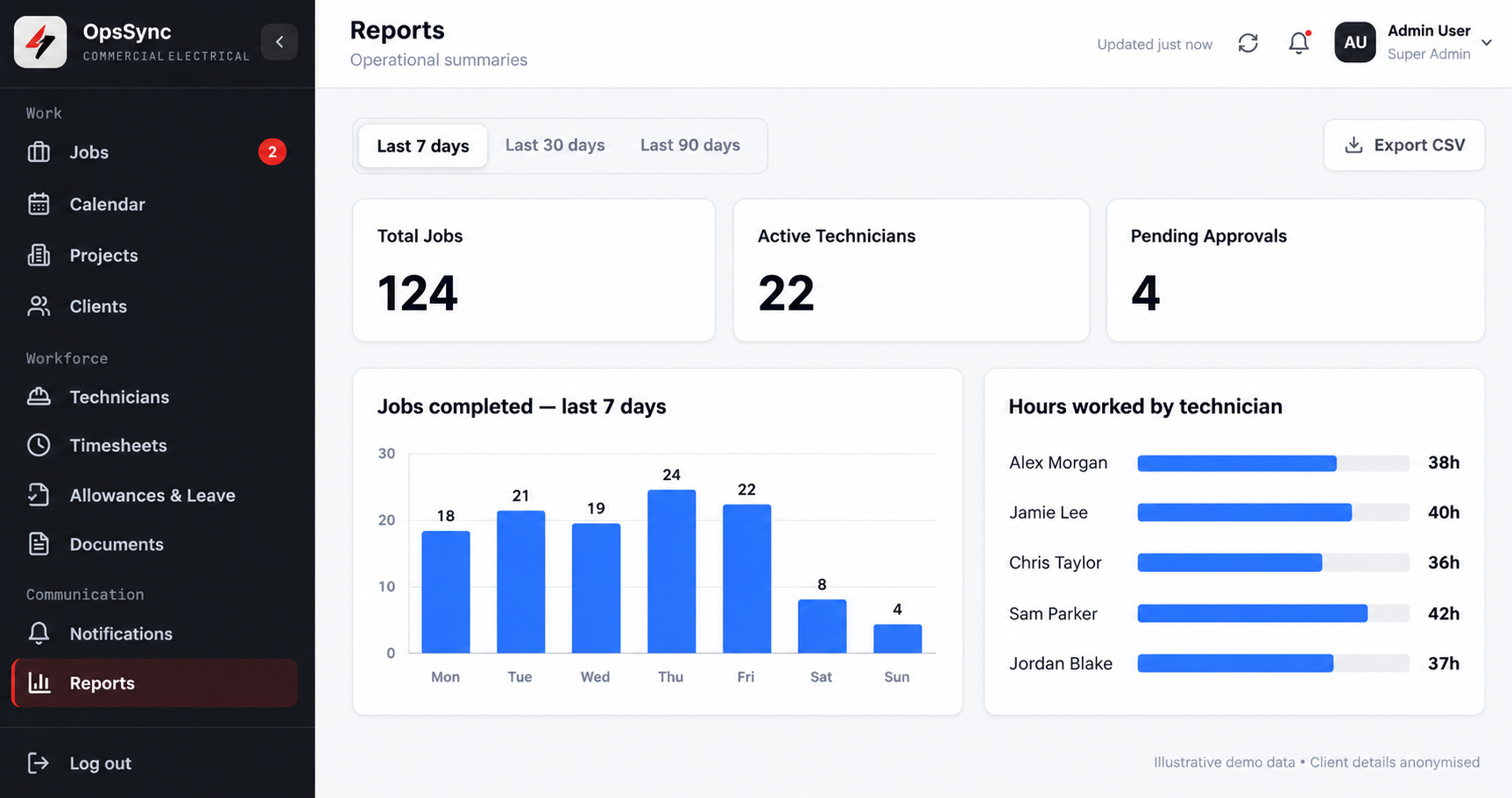
Track completed jobs, hours worked and pending approvals, with CSV export for analysis.
- 5
Extend with AI (next stage)
Concept: let managers ask operational questions in plain language, with manager approval kept in control.
The operational challenge
More moving parts.
One connected view.
For a large electrical company, delivering work is only part of the job. Operations also needs to coordinate technicians across projects, manage changing schedules and keep approvals moving. Every allocation affects the next: a delayed site visit can change a technician’s availability, while an outstanding timesheet can hold up an operational review.
The challenge is bringing that information together without losing the detail that matters in the field. Managers need the big picture; coordinators need a practical schedule; each job needs a clear owner and status.
This case study focuses on how OpsSync field service and workforce management software supports that connected operating model for a large electrical company. The emphasis is on streamlined coordination and visibility, rather than an unverified claim about time or cost savings.
The solution
An operational workspace built around electrical service delivery.
OpsSync connects the information needed to plan, assign and review work. Rather than treating scheduling and reporting as separate tasks, it makes them part of the same operational conversation.
A clearer view of active work
Job details, project context, assigned technicians and progress are brought into one operational view, giving managers a consistent place to review the work ahead.
Coordinated technician scheduling
A shared weekly calendar makes allocations visible across the team, helping coordinators review availability and understand how work is distributed.
Operational reporting in context
Job activity, technician hours and outstanding approvals can be reviewed together, supporting a more informed conversation between operations and management.
Goals → Capabilities → KPIs
What changed — and how to measure it.
The connected workspace supports three operational goals. Each maps to a practical capability and a KPI to track over time.
Operational goal
01Clear ownership of every job
Capability in the workspace
Job list with technician, site & status
KPI to track
Unassigned jobs · Job completion rate
Measured result not supplied
Operational goal
02Better-coordinated field teams
Capability in the workspace
Shared weekly technician calendar
KPI to track
Schedule conflicts · Technician utilisation
Measured result not supplied
Operational goal
03Visible workload & approvals
Capability in the workspace
Job activity, hours & approval reporting
KPI to track
Pending approvals · Approval turnaround
Measured result not supplied
Capability mapping, not a performance scorecard. Baseline values, targets and measured results are needed before these KPIs can be reported as met.
Want a clearer operating picture for your business?
Discuss your goalsStep 2 · Jobs & dispatch
Job management with the right context.
The dashboard brings a job’s description, project, technician, scheduled time, priority and status into one list. For an electrical operations team, that context is essential: reviewing a switchboard upgrade requires more than knowing that a job exists. It also means understanding where it belongs, who is responsible and whether the work is assigned, in progress or completed.
A consistent view of active work gives coordinators and managers a shared reference point for daily planning and follow-up. It is the foundation for business process automation that follows the workflow rather than adding another disconnected task.
Step 3 · Workforce scheduling
A weekly calendar for the whole field team.
OpsSync’s calendar organises work by technician and day, with time windows, job descriptions and site details visible together. Status indicators distinguish assigned, in-progress and completed work, so the schedule communicates both the plan and the state of delivery.
For commercial electrical teams coordinating installation, inspection and maintenance tasks, this makes it easier to review allocations and spot where a change needs attention. The same coordination challenges also appear in construction and contractor operations, where people and projects move across multiple sites.
Step 4 · Reporting & approvals
From activity to a clearer operational picture.
The reporting view puts job totals, active technicians and pending approvals alongside completed-job activity and hours worked. Managers can review operational information over different time periods, while CSV export supports further analysis outside the platform.
The value is not simply another chart. It is the ability to discuss workload, progress and outstanding decisions using a consistent set of information. Counts shown in the supplied screens are illustrative, not evidence of productivity gains or the client’s actual workforce size.
Step 5 · Next-stage concept · AI operations assistant
A faster way to ask operational questions.
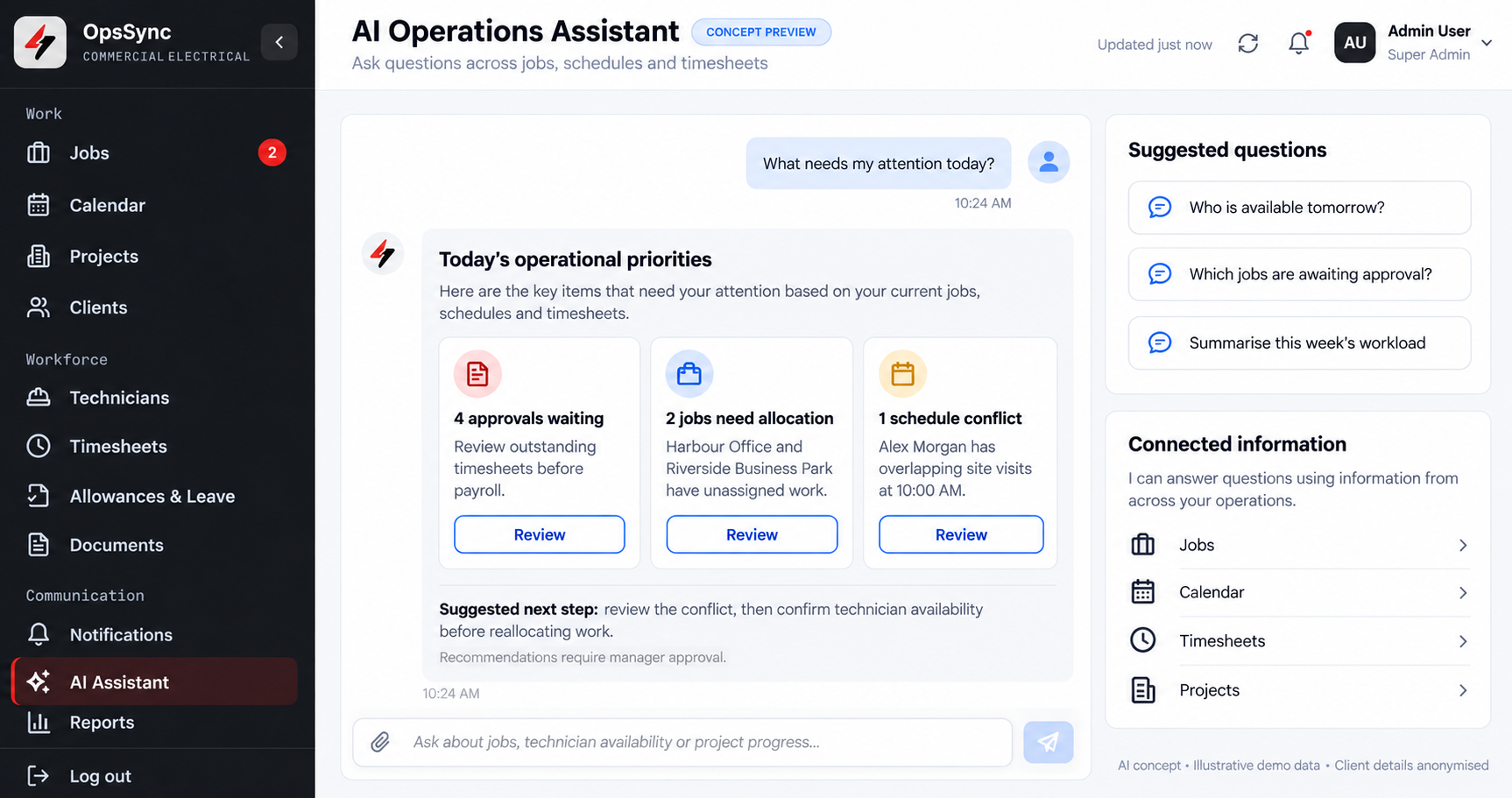
The supplied AI Operations Assistant concept shows how a manager could ask questions across jobs, schedules and timesheets. Suggested questions include who is available tomorrow, which jobs are awaiting approval and how the week’s workload is distributed.
The concept brings priorities into a conversational view: approvals waiting, jobs needing allocation and a possible scheduling conflict. Recommendations remain subject to manager approval. This image is a concept preview, not confirmation of a deployed AI assistant or automated decisions in the client’s operation.
Explore our AI consulting and development services to discuss where an assistant could add value, what information it would need and which controls should remain with your team.
The takeaway
Streamlining starts with connected operations.
OpsSync’s work with this large electrical company centres on a practical operational improvement: bringing jobs, technician scheduling and reporting into a connected workspace. That creates a clearer basis for coordinating service delivery and reviewing the work that needs attention.
For electrical contractors considering a similar approach, the starting point is the operating model, not a feature checklist. Understand how work is allocated, which approvals matter and where teams need shared visibility. Then shape the software around those decisions.
10xGrowth Labs works with businesses in Adelaide and across Australia on digital transformation and custom software. If your team is managing similar operational complexity, we can discuss how an OpsSync-based workflow could fit your business.
Client identity and measured performance results have not been published. No savings percentages or customer quotations are attributed to this project.
Your next step
Make your operations the next success story.
Electrical, trades or field service business? Tell us where jobs, scheduling or approvals are slowing your team down.