ClinicX
Your clinic closes. Patient enquiries don’t.
ClinicX connects AI-assisted enquiry handling, approved doctor information and SMS/email follow-up with a clear path to a booking request — so tomorrow’s reception team starts with context, not a cold callback list.
Discuss your clinic’s after-hours enquiry workflow
Inside ClinicX
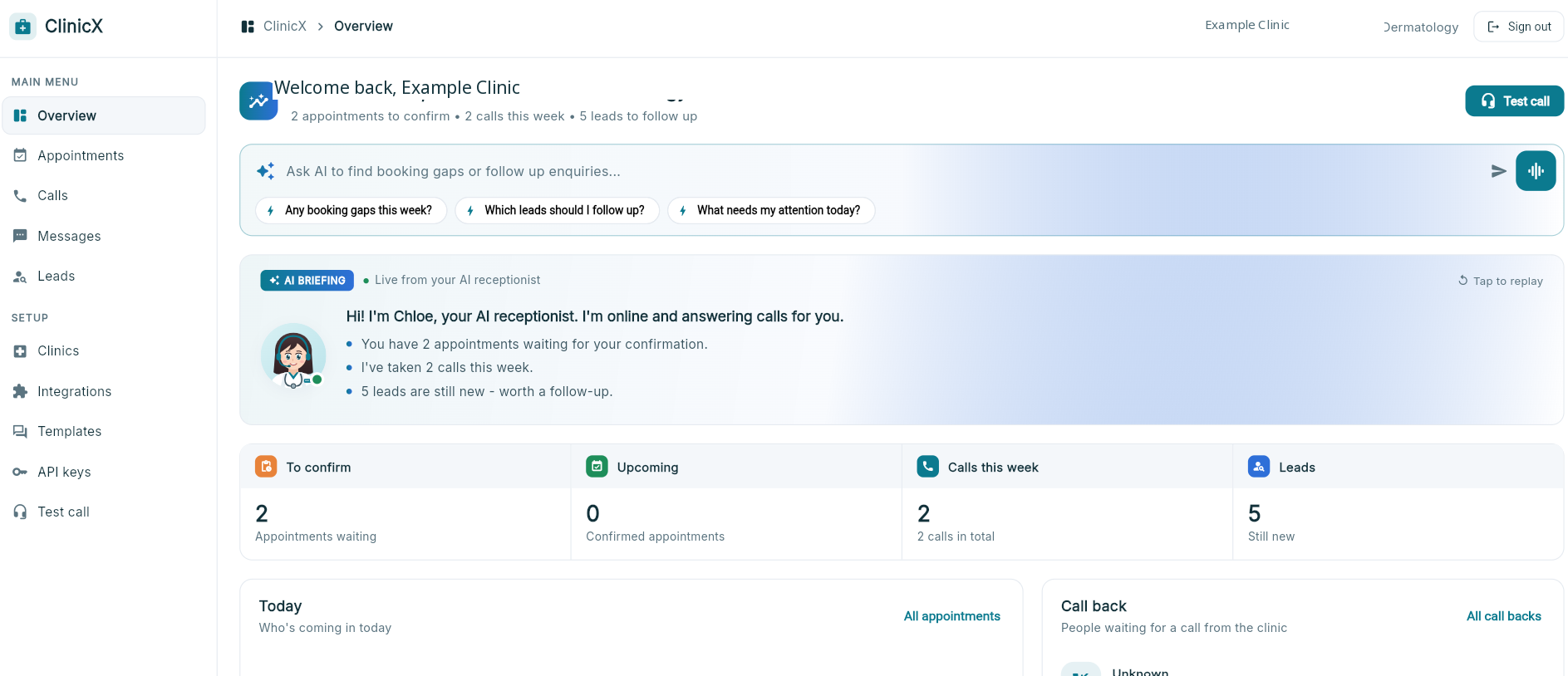
Supplied product presentation. Demonstration data, not customer results.
- Sector
- Healthcare
- Story status
- Product showcase
- Focus
- After-hours AI receptionist · Clinic booking workflows
01 / The challenge
Start with the work,
not a feature list.
A patient asks about a doctor at 8pm. Another responds to an ad over the weekend. If the next step is a voicemail or an unanswered message, interest can fade before reception returns. The opportunity is to capture the enquiry, answer approved administrative questions and move it towards an appointment request without leaving staff to reconstruct the conversation.
The gap is not always a lack of enquiries. It can be the time between a patient reaching out and someone helping them take the next step. An evening question about a doctor, a weekend ad enquiry or an unanswered call can become another callback for an already busy reception team. ClinicX’s proposed after-hours journey connects the response, the patient’s preferences and the booking request. The supplied screens show the administrative workspace, reusable messages and lead-source setup; they do not establish a measured recovery rate or a fully deployed after-hours service.
02 / The approach
After-hours AI receptionist · Clinic booking workflows
- 01After-hours enquiry
- 02Approved doctor information
- 03Patient preferences captured
- 04Booking request
- 05Staff confirmation
- 06SMS / email follow-up
Product journey illustrated by supplied screens; implementation scope is confirmed separately.
Capture the enquiry while interest is fresh. Collect contact details, the service requested and preferred times, with clear consent and a staff handover for exceptions. Do not ask an assistant to make clinical judgements.
Answer from approved clinic information. A scoped LLM connection can explain doctor profiles, services and booking steps in natural language, without inventing qualifications, availability or medical advice. This knowledge and model setup is proposed, not verified by the supplied screens.
Progress towards a booking request. Preserve the conversation and preferences for reception to review. A pending request stays pending until staff confirm; a live scheduling connection would need separate scoping and verification.
Give follow-up a consistent voice. The supplied Templates screen includes SMS, email and Automatic SMS categories, with enquiry acknowledgement and booking follow-up drafts. For example: “Thanks for contacting Example Clinic. We’ve received your enquiry. Reply with your preferred appointment time and our team will confirm the next step.” This is illustrative copy, not an email sent from this website.
Connect the entry points accurately. Zapier / Webhook is marked available in the supplied preview; direct Facebook Lead Ads and the website-form connection are coming soon. Email sending requires a configured provider. Reception can then review the enquiry queue and Chloe’s daily briefing with the original context intact.
The product in practice
A closer look at the workflow.
Supplied product visuals show the capabilities discussed in this story. Screen counts are demonstration data, not measured business results.
03 / Product value
Give every captured enquiry a useful next step — and give reception the information needed to follow through.
Keep the conversation moving after hours
An AI-assisted journey can capture contact details, the service requested and preferred appointment times while reception is closed. Exceptions are handed to staff rather than guessed.
Help patients find the right information
Use clinic-approved doctor profiles, services, opening hours and booking instructions. The assistant provides administrative information, not diagnosis or medical advice; this knowledge setup is proposed, not demonstrated by the screenshots.
Move interest towards a booking request
Carry enquiry details and preferences into a pending appointment request. Only staff confirmation makes it a confirmed booking; automatic availability checks depend on the scoped booking connection.
Make follow-up consistent
The supplied Templates screen shows SMS, email and Automatic SMS categories, including enquiry acknowledgements and booking follow-up drafts. Email sending requires an email provider to be configured.
Connect lead sources without losing context
The Integrations preview marks Zapier / Webhook available for incoming form or ad leads. Direct Facebook Lead Ads and a ready-made website form are explicitly coming soon.
LLM assistance with clinic controls
Scope a language-model connection around approved clinic information, structured enquiry capture and staff handover. The screenshots do not verify a model provider, live LLM connection or autonomous clinical decisions.
What to measure next.
These are review questions for evaluating the workflow, not achieved KPIs. Baselines and measured outcomes have not been supplied for publication.
- After-hours response
- How long do evening and weekend enquiries wait for a useful response?
- Enquiry progression
- How many captured enquiries progress to a staff-confirmed appointment, rather than only a pending request?
- Reception handover
- Can staff see the patient’s question, requested service and preferred time without restarting the conversation?
04 / Evidence & status
What this story shows.
Supplied interface previews, anonymised for publication. They show templates and integration status, not proof that every feature or an LLM connection is deployed or independently verified.
After-hours handling and approved doctor-information responses describe the intended workflow. No lost-enquiry totals, conversion uplift, patient outcomes or customer performance results are claimed.
Staff remain responsible for appointment confirmation and follow-up. The assistant must not provide medical advice; email delivery and booking-system connections depend on configuration.
Banner photography is AI-generated editorial illustration, not a photograph of the client, its staff or its premises. Product screens are the separately supplied visual evidence.
Explore a similar workflow
From this story to your next step.


A similar challenge?
Let’s talk about your workflow.
Work with our Adelaide-based team to identify the information, decisions and handovers your software needs to support.